Shala Darpan 2026-27: New Session Enrollment Steps
Rajasthan’s government schools resume on Monday, 22 June 2026, after the summer break (17 May–20 June). For every principal and School Login in-charge, day one carries one priority: complete the 2026-27 naamankan (student enrollment) and lock student data on the Shala Darpan portal. This guide walks through the exact School/Office Login steps, the order they must follow, and the errors that stall most schools.
When 2026-27 Enrollment Data Entry Happens
The academic session 2026-27 began on 1 April 2026. Before the vacation, the Praveshotsav campaign — Rajasthan’s door-to-door enrollment drive for out-of-school and dropout children aged 3 to 18—gathered field data through the Shikshak App’s Digital Praveshotsav module.
When schools reopen on 22 June, that groundwork moves to the desk. Principals verify those survey entries, register fresh admissions, and finalize every student’s class on the portal. Speed matters here: enrollment figures feed mid-day meal counts, free textbook supply, and scholarship eligibility — so a slow entry costs the school real resources.
Step 1: Log In to School/Office Login
Open the official portal at rajshaladarpan.rajasthan.gov.in. The address moved from rajshaladarpan.nic.in, so update any saved bookmark and retype your password if browser autofill fails.
- Click “Login” (top right) and select School/Office Login.
- Enter your school user ID and the password issued by your education office.
- Type the captcha and click Login.
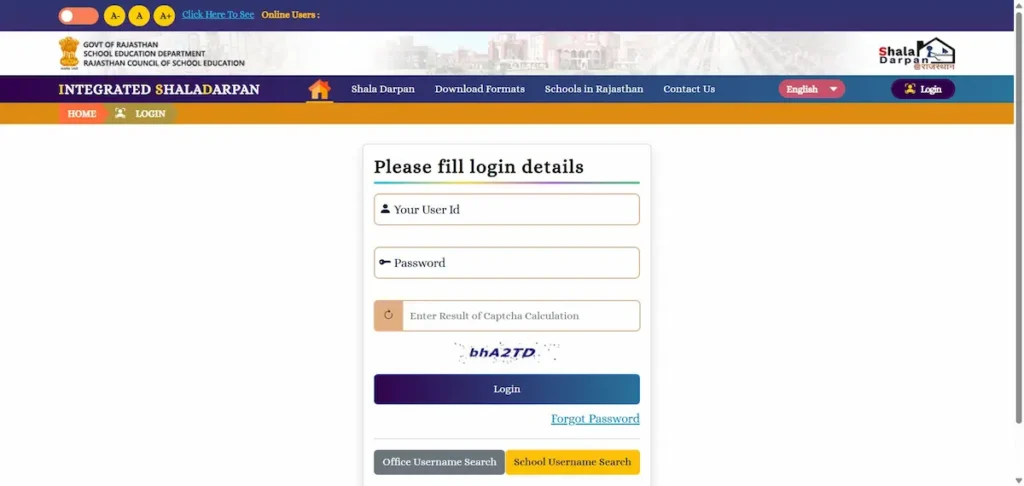
- For sensitive modules, an OTP arrives on the principal’s registered mobile number.
School Login controls the entire school’s records. Individual teachers cannot enter naamankan — that responsibility sits with the principal or designated admin in charge.
Step 2: Promote the 2025-26 Batch First
Do not begin new admissions until last year’s students are moved forward. Open the Student module and run class promotion for the 2025-26 batch — Class 1 to 2, Class 2 to 3, and so on. Students who passed move to their next class; those marked detained stay back.
This order is non-negotiable. Entering new admissions before promotion creates duplicate records and class-strength mismatches that are slow to untangle later.
Step 3: Enter New Admissions (Naamankan)
With promotion done, register each new student:
- Go to Student module → New Admission / New Form.
- Enter details exactly as in the supporting documents — name, date of birth, parent’s name, category, and Jan Aadhaar number.
- Assign or confirm the SR Number (Scholar Register Number) — the unique ID that follows the child through their entire school career.
- Choose the correct class and section, then save.
Accuracy at this stage is critical. The SR Number links the student to results, the Holistic Progress Report, and Direct Benefit Transfer (DBT) scholarships routed through Jan Aadhaar.
Read also: Raj PSP vs Shala Darpan: Which Portal for Private Schools?
Step 4: Verify, Then Confirm
After entry, cross-check the class-wise student count against your physical admission register. Confirm no child appears twice and no transferred student remains on the rolls. Once verified, the data flows to the Citizen Window, where parents can view it without any login.
Common Naamankan Errors and Fixes
- Wrong class entry: Do not delete the record. In the Student module, open New Form → “Remove for Wrong Entry,” then re-enter the student with the same SR Number in the correct class. This keeps the chronological record intact.
- Duplicate admission error: This usually means the student already exists under another SR Number or school — often a transfer case. Obtain the Transfer Certificate (TC) from the previous school before re-attempting the entry.
- OTP not received: The principal’s number in the school profile is outdated. Update it under School Profile, then retry.
- Session expires mid-entry: The portal logs out after about 20 minutes of inactivity, and traffic is heavy in reopening week. Save each record as you go, and enter data in early morning or late evening for a faster connection.
Reopening-Day Checklist
- Confirm login works on the new .rajasthan.gov.in URL
- Promote the 2025-26 batch before any new entry
- Enter new admissions with correct SR Number and Jan Aadhaar
- Match the portal count with your physical register
- Report data issues to your PEEO/UCEO or Block Education Officer (BEO)
Finishing naamankan in the first week keeps your school’s entitlements — meals, textbooks, and scholarships — on schedule and your records clean for the rest of 2026-27.