Shala Darpan (शाला दर्पण) 2026: Staff Login, School Login & Internship
Integrated Shala Darpan — available at rajshaladarpan.rajasthan.gov.in — is Rajasthan’s official government school education portal. Developed by the National Informatics Centre (NIC) Rajasthan and managed by the Rajasthan Council of School Education (RCSE), it serves 65,000+ government schools, 8 million students, and 4 lakh teaching and non-teaching staff across the state. Locally called Raj Shala Darpan — and sometimes typed as Sala Darpan — this portal manages everything from staff records to student results under one login. This website is not official. राजस्थान सरकार का शाला दर्पण (शाला दर्पण) portal handles all actual logins and data actions at the official URL only.
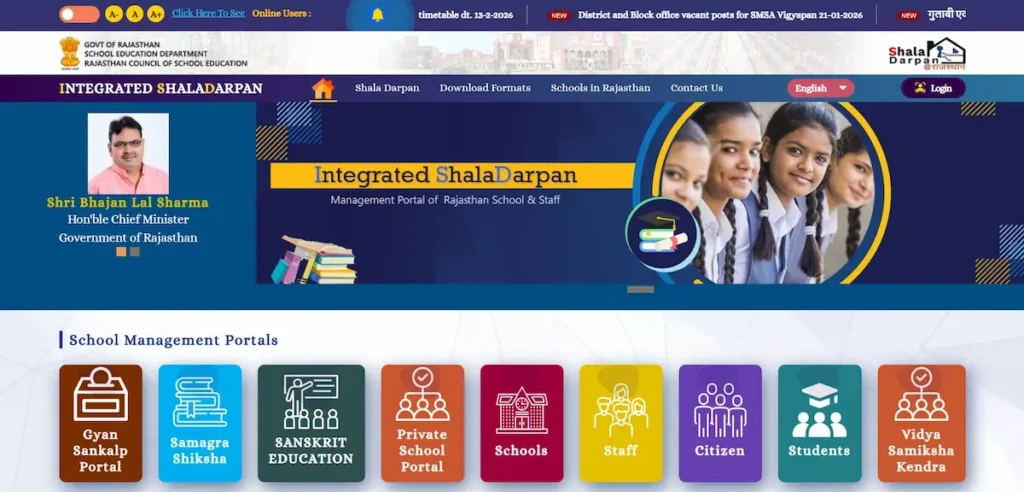
शाला दर्पण क्या है? (What is Shala Darpan?)
Rajasthan's school education system runs on a single, government-built digital platform — Integrated Shala Darpan (एकीकृत शाला दर्पण). The portal, classified as an Education Management Information System (EMIS), was developed by NIC Rajasthan under the Digital India initiative and operates under the direct management of RCSE, Jaipur.
Portal at a Glance
| Detail | Verified Data |
|---|---|
| Official name | Integrated Shala Darpan (एकीकृत शाला दर्पण) |
| Official URL | rajshaladarpan.rajasthan.gov.in (also: rajshaladarpan.nic.in) |
| Developed by | National Informatics Centre (NIC), Rajasthan |
| Managed by | Rajasthan Council of School Education (RCSE), Jaipur |
| Scope | 65,000+ government schools — 8 million students — 4 lakh staff |
| Classification | EMIS — Digital India initiative |
| Academic coverage | Class 1 to Class 12 (primary, secondary, Sanskrit education) |
Before integration, two portals ran separately — "Shala Darshan" for primary education and "Shala Darpan" for secondary education. Teachers maintained records on both. The Rajasthan government merged them into one Integrated Shala Darpan covering Class 1 through Class 12. This merger explains why both names still appear across search results and official documents. Some users also search for it as "Sala Darpan"—a phonetic variation common in voice and mobile searches.
One boundary worth knowing: this portal is for Rajasthan government and government-aided schools only. Private schools manage their records on a separate platform — Raj PSP at rajpsp.nic.in.
Shala Darpan Staff Login — Step-by-Step Guide (शाला दर्पण स्टाफ लॉगिन)
Staff Login is for individual government teachers only — leave applications, salary details, service book, and ACP tracking. It is not the same as School Login. Using the wrong login is the most common mistake on this portal.
Find Your NIC-SD ID First
The NIC-SD ID is a 7-digit unique code assigned to every government school and employee. It links directly to your Format 10 — the official personnel record. You need this ID before completing registration.
Steps to find your NIC-SD ID:
- Go to rajshaladarpan.rajasthan.gov.in
- Click the "Staff Window" tab on the homepage
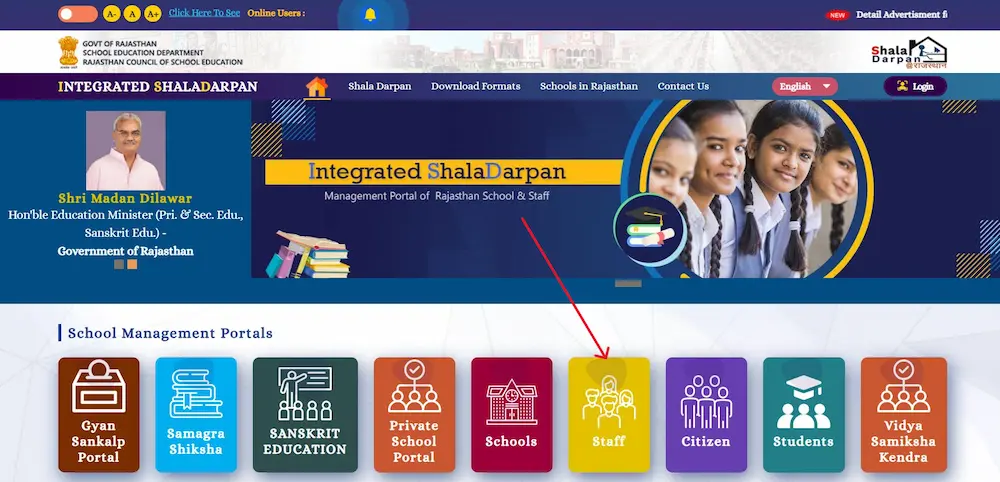
- Click "Know Staff Details" in the sidebar
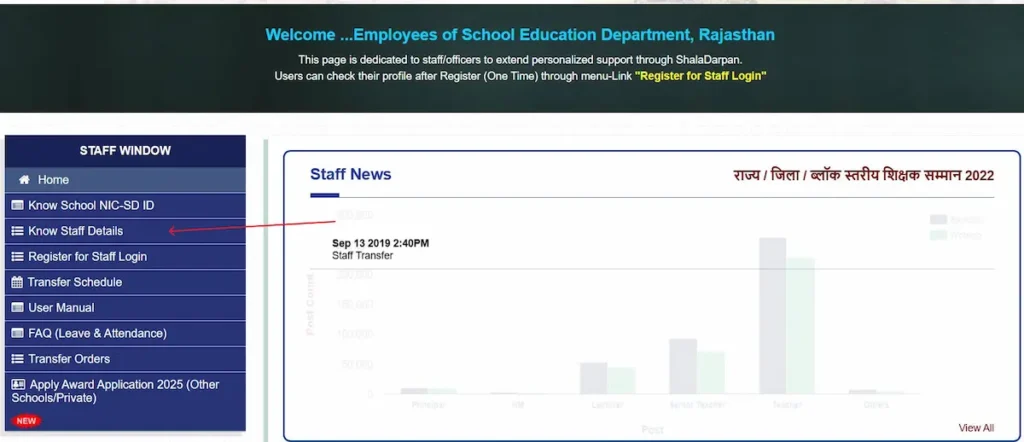
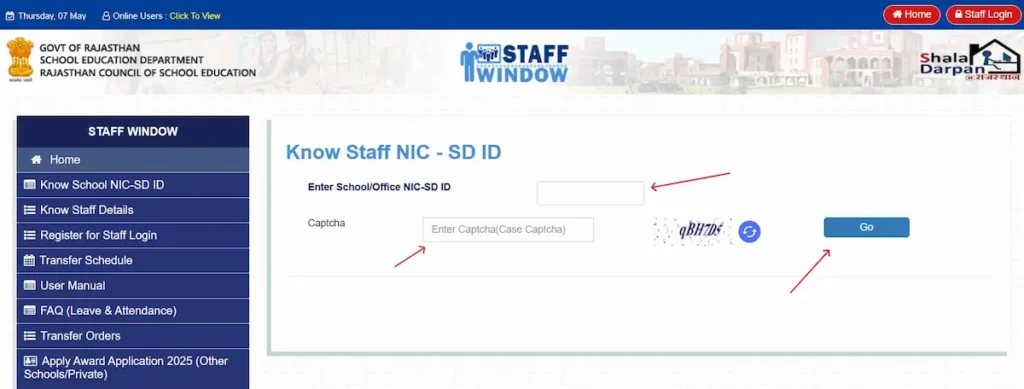
- Type your school name (minimum 4 characters) and select your district, or search by block
- Enter the captcha and click "Go" — your NIC-SD ID appears alongside your name and current posting
First-Time Registration (One-Time Process)
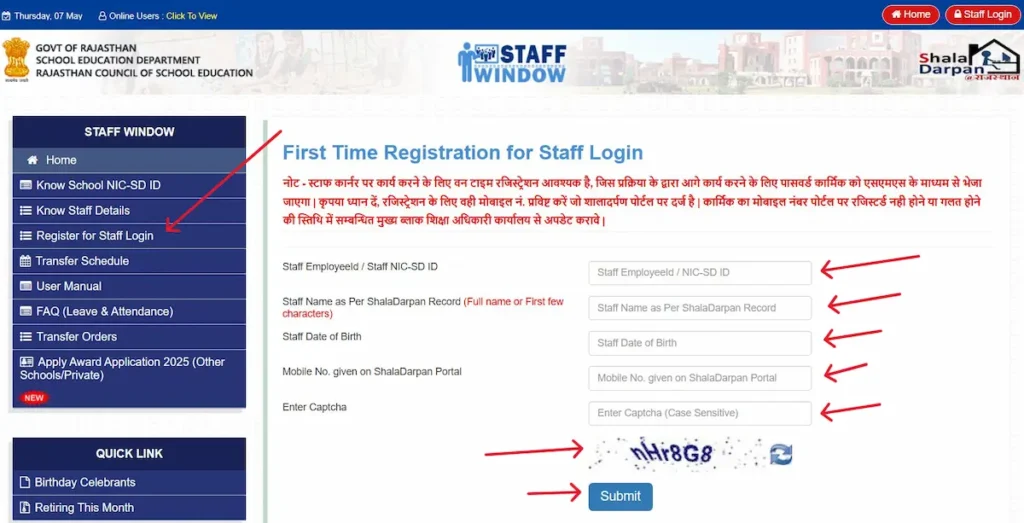
Open the Staff Login page and click "First Time Registration for Staff Login." Enter these details exactly as they appear in your Format 10:
- Staff Employee NIC-SD ID
- Staff Name
- Date of Birth
- Mobile number registered on the portal
- Captcha code
Submit the form. Login credentials arrive by SMS to your registered mobile number.
Returning User Login
- Go to rajshaladarpan.rajasthan.gov.in and click "Staff Login" (top right)
- Enter the Username and Password received by SMS
- Fill the captcha — it expires in 2 minutes, so submit immediately after entering it
What the Staff Window Gives You
- Apply for leave (छुट्टी आवेदन) and track approval status at each stage
- View basic salary details — the full salary slip PDF is available on PayManager Rajasthan, which is a separate portal
- Submit transfer applications and track their current status
- View and update your service book and service record
- Track ACP (Assured Career Progression) and promotion eligibility
- Submit grievances and follow resolution progress using your tracking ID
- Download office orders including transfer orders and joining or relieving orders
- View ACR (Annual Confidential Report) entry and approval status
Note: Staff Login and School Login use separate credentials entirely. Principals managing student records must use School/Office Login — not Staff Login.
Shala Darpan School Login — Principal & Admin Guide (स्कूल लॉगिन)
School Login — also called School/Office Login — is for the school principal or designated admin in-charge. It controls the entire school's data on the portal: student records, staff management, result entry, and circulars. Individual teachers do not use this login.
School Login Steps
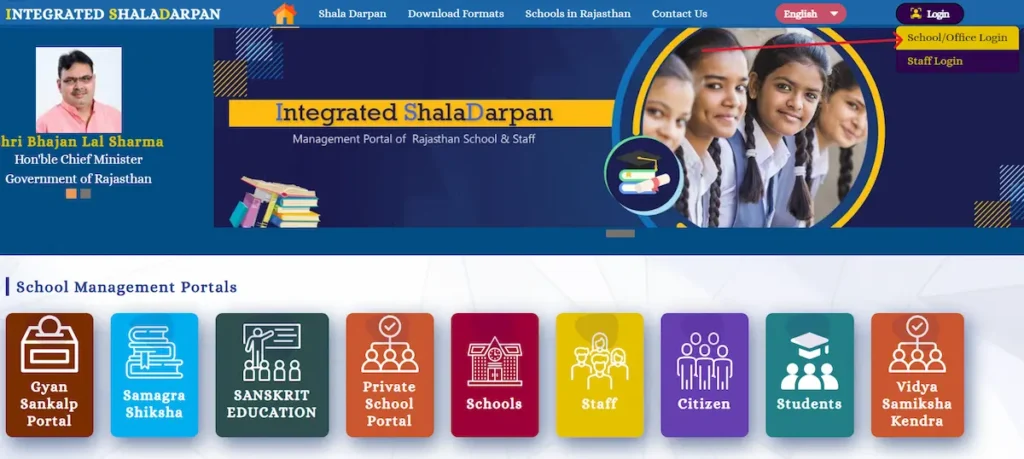
- Open rajshaladarpan.rajasthan.gov.in in your browser,k
- Click the "Login" button at the top right and select "School/Office Login"
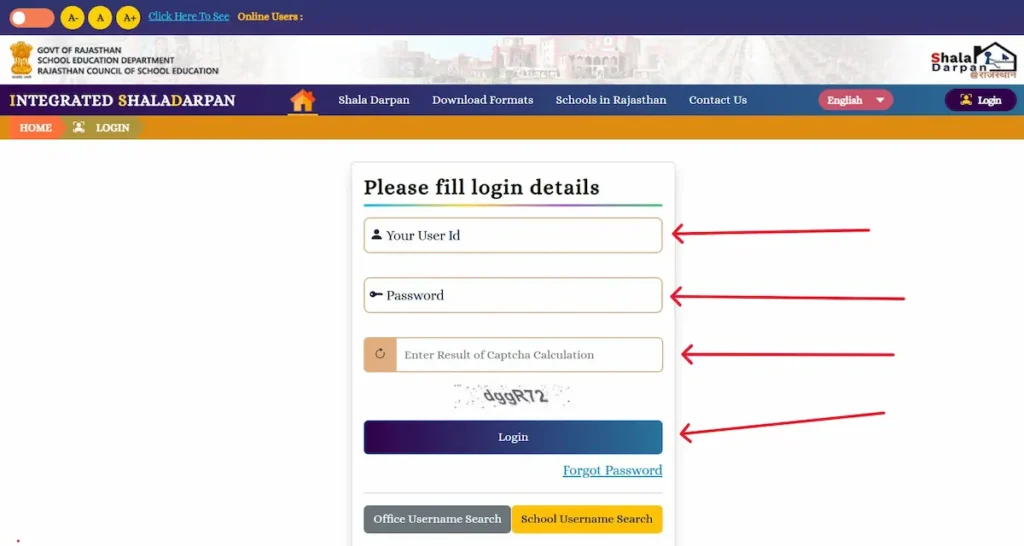
- Enter your School User ID and the password assigned by your education office
- Enter the captcha and click "Login"
- For result entry and other sensitive modules, an OTP arrives on the principal's registered mobile number — enter it to proceed
URL update (2026): The portal address changed from rajshaladarpan.nic.in to rajshaladarpan.rajasthan.gov.in. Update any saved bookmarks — saved passwords may not carry over to the new address.
How to Find Your School Login ID (NIC-SD ID Search)
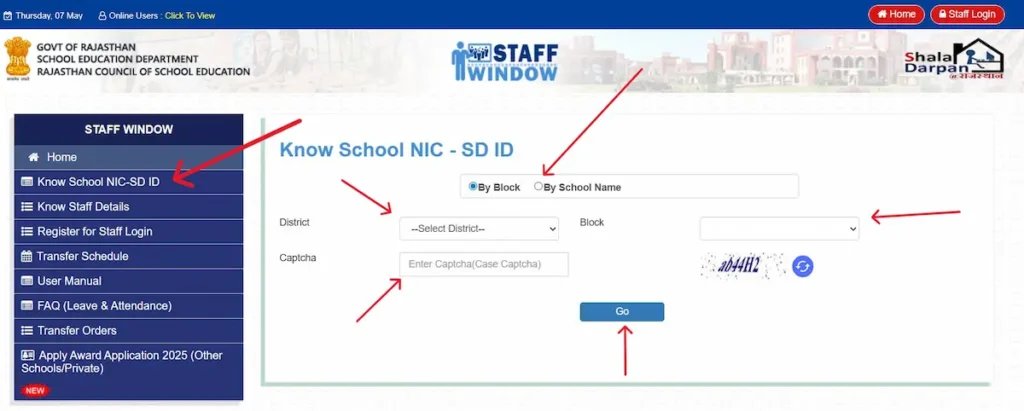
- Go to rajshaladarpan.rajasthan.gov.in and click "Staff Window"
- Click "Know School NIC-SD ID" from the options on that page
- Search by School Name (at least 4 characters) or by District and Block
- Enter the captcha and click "Go" — the school's 7-digit NIC-SD ID appears with full school details
What the School Dashboard Gives You
- Student enrolment and record management: new admissions, TC generation, class promotion
- Full staff data management and Format 10 verification — all teacher mobile numbers, email IDs, and posting details must be updated here first
- Student attendance marking and report generation
- Result entry for Class 5, 8, 9, and 11 including marks and holistic progress reports
- Access to current circulars, government orders, and Praveshotsav 2026-27 guidelines
Citizen Window & School Search — No Login Required (नागरिक विंडो)
The Citizen Window requires no login or registration. Any parent, student, or citizen can access all public school data for free, directly from rajshaladarpan.rajasthan.gov.in.
How to Search a School (3 Methods)
- By District and Block: Select your district and block from the dropdowns. The portal lists all primary, secondary, and higher secondary government schools in that area.
- By School Name: Type at least 4 characters of the school name, select the district, enter the captcha, and click Search.
- By Pincode: Enter your 6-digit pincode to see geographically nearest government schools.
Each result displays: school name, NIC-SD ID, school type, number of students, number of teachers, and infrastructure status.
What the Citizen Window Provides
- School reports — infrastructure details, student count, teacher postings
- Staff reports — teacher names, qualifications, posting status
- Student reports — attendance and academic progress for enrolled students
- Scheme search — check which government scholarships your child qualifies for
- School search for internship placement — B.Ed and D.El.Ed trainees use this to review schools before filling internship preferences
Shala Darpan Internship 2026 — B.Ed, D.El.Ed, BSTC Allotment Guide (इंटर्नशिप)
The Shala Darpan Internship module is the only official platform for teacher trainee school allotment in Rajasthan. All B.Ed, D.El.Ed (BSTC), and integrated BA-BEd / BSc-BEd trainees must use this portal for their practical training school placement.
Who Uses This Module
- B.Ed (Bachelor of Education) trainees
- D.El.Ed / BSTC (Diploma in Elementary Education) trainees
- Integrated BA-BEd and BSc-BEd programme students (4-year integrated degrees)
How to Check Internship Allotment Status
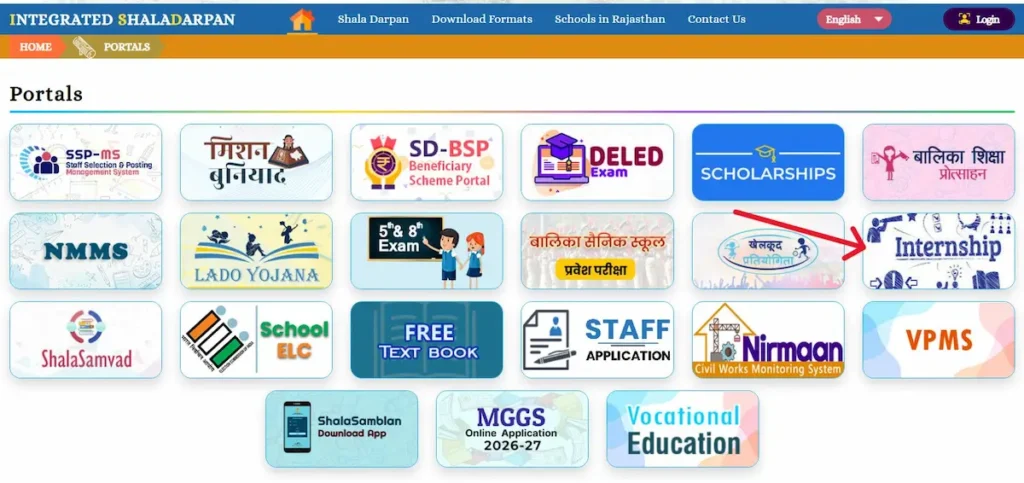
- Go to rajshaladarpan.rajasthan.gov.in , Scroll down, click View More then Click "Internship".
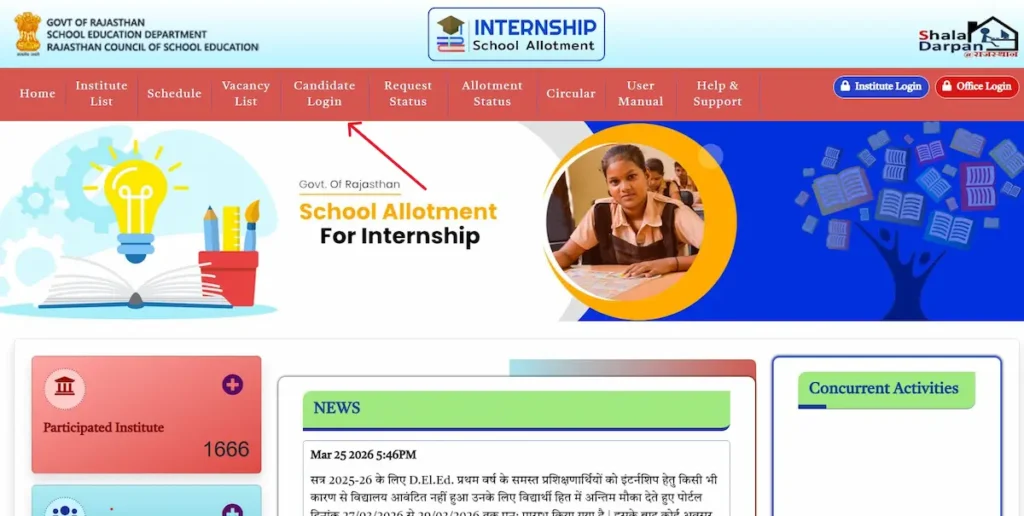
- On the internship home page, click "Candidate Login"
- Enter your Username, Password, and Captcha code — use "Forgot Password" if needed
- After login, click the menu icon, go to "Candidate Profile," then select "Internship Request"
- Click "Allotment Status" to see whether a school has been assigned — if not yet allotted, the page shows the current round number and what to expect next
Choice Filling Rules
- Select a maximum of 15 schools in order of preference
- Selection works district-wise — choose district first, then block, then school name
- Allotment runs on an online lottery system where preference order and merit both apply
- If not allotted in Round 1, subsequent rounds are held — check the portal regularly for updates
- After allotment, report to the assigned school within the deadline printed on your allotment letter
Shala Darpan 5th & 8th Class Result 2026 — Check by Roll Number (परिणाम देखें)
Rajasthan Class 5 and Class 8 board exam results for the 2025-26 session were declared on 24 March 2026 on the official Shala Darpan portal. Approximately 26 lakh students can check results online.
Method 1: Check by Roll Number and District (Recommended)
- Go to rajshaladarpan.rajasthan.gov.in and scroll to the "5th & 8th Exam" button on the homepage
- Click "5th & 8th Exam," then on the next page click the three-dot menu and select "Result"
- Choose your class (5th or 8th), enter the roll number, select district, complete the captcha, and click "Search"
- The marksheet appears on screen — click "Download" or "Print" to save a copy
Method 2: Search by Name (If Roll Number is Lost)
Enter the student's name, father's name, and date of birth, then select the class and click Search. This method may return more than one result when names are common — confirm the correct record using the date of birth.
Grading System
| Grade | Marks Range | Status |
|---|---|---|
| A | 91–100% | Pass |
| B | 75–90% | Pass |
| C | 60–74% | Pass |
| D | 33–59% | Pass |
| E | Below 33% | Fail |
Minimum passing marks: 33% per subject (D grade). Students who receive an E grade can appear in the Supplementary Exam scheduled for July 2026. Official digital marksheets are also available through DigiLocker using the student's Shala Darpan details — no physical copy needed for most academic purposes.
Scholarships & Government Schemes on Shala Darpan (छात्रवृत्ति और योजनाएं)
The Beneficiary Scheme Portal (BSP) within Shala Darpan manages direct benefit transfers for eligible students. No separate registration is needed — eligibility is tracked automatically based on school records and Jan Aadhaar data.
- Gargi Puraskar: Girls scoring 75% or above in the Class 10 board exam receive Rs 3,000 as the first instalment. Class 12 pass students with 75% or above receive Rs 5,000 as the second instalment. Applications go through BSP.
- Lado Yojana (2026): A girl child financial empowerment initiative introduced in 2026. Check current eligibility criteria on the BSP portal directly, as amounts update annually.
- NMMS (National Means-cum-Merit Scholarship): For Class 8 students from lower-income families. Eligibility is tracked automatically through Shala Darpan school records.
- Pre-Matric and Post-Matric Scholarships: Available for SC, ST, OBC, and EWS students. Family income and category data sync through Jan Aadhaar.
- Transport Voucher and Free Textbook: Entitlements appear in student profiles under the scheme portal.
To check which schemes your child qualifies for: go to rajshaladarpan.rajasthan.gov.in, open Citizen Window, click Scheme Search, and enter the school name or student details.
Common Shala Darpan Login Problems — Real Fixes (लॉगिन समस्याएं)
Every error below is a real problem reported by Rajasthan government school teachers and parents during 2025-26. Each fix follows the verified resolution path.
Error 1: "NIC-SD ID Not Found" During Staff Registration
Root cause: The ID is correct, but the name or date of birth entered does not match Format 10 records exactly. Fix: Ask your school principal to check and correct your Format 10 entry through School Login. Once corrected, try registration again after 24 hours.
Error 2: OTP Not Received
Root cause: The mobile number stored in your Format 10 is outdated or wrong. Fix: You cannot update the mobile number yourself from the Staff Window. Ask your principal to update it through School Login. OTP delivery resumes within one working day after the update.
Error 3: Captcha Not Loading or Always Showing Wrong
Root cause: Browser cache build-up or an outdated browser version. Fix: Clear your browser cache using Ctrl + Shift + Delete, switch to Google Chrome, and open the portal in incognito mode. The captcha expires in 2 minutes — enter it last and click Login immediately.
Error 4: Result Not Showing by Roll Number
Root cause: Data sync delay after result declaration, or the district entered does not match the school's district. Fix: Use the school's district — not the student's home district. If the portal is slow after result declaration, wait 2–4 hours and try again. The Name, Father's Name, and DOB search works as a reliable alternative.
Error 5: "Mobile Not Registered" at Staff Login
Root cause: The phone number used during registration differs from the number in Format 10. Fix: Click "Forgot Password," enter your NIC-SD ID and registered mobile number. If that does not work, contact your Block Education Officer (BEO) to verify and update your Format 10.
Error 6: Portal Not Loading or Session Expired
Root cause: High server traffic during result season, or the session timed out after 20 minutes of inactivity. Fix: Try again during early morning or late evening hours. Always save your entered data before the session ends.
Error 7: School Data Wrong or School Not Found in Search
Root cause: A recent data update has a 24–48 hour sync delay, or fewer than 4 characters were typed in the school name search field. Fix: Enter at least 4 characters of the school name. If the school's details are incorrect on the portal, the principal must update them through School Login, under the School Profile section.
Sanskrit Shala Darpan — संस्कृत शिक्षा विभाग
The official Shala Darpan portal homepage lists three education departments: Primary Education (Prarambhik Shiksha), Secondary Education (Madhyamik Shiksha), and Sanskrit Education (Sanskrit Shiksha). Teachers and staff under the Sanskrit Education Department access the same portal at rajshaladarpan.rajasthan.gov.in — there is no separate URL for Sanskrit schools. The Staff Login and School Login process is identical to the steps covered above. The portal homepage also links to Bhasha evam Pustakalaya Vibhag (Language and Library Department). If you searched for "Sanskrit Shala Darpan," this is the correct portal — use the Staff Login steps above.
अक्सर पूछे जाने वाले प्रश्न (FAQ — शाला दर्पण पोर्टल)
Shala Darpan की official website कौन सी है?
The official website is rajshaladarpan.rajasthan.gov.in — also accessible via rajshaladarpan.nic.in. Both URLs reach the same Integrated Shala Darpan portal. Always confirm you are on the .rajasthan.gov.in or .nic.in domain before entering any login credentials.
Staff Login और School Login में क्या अंतर है?
Staff Login is for individual government teachers — leave, salary details, service book, and ACP. School Login (School/Office Login) is for the principal or designated admin to manage student records, TC generation, result entry, and staff data for the entire school.
क्या Citizen Window के लिए login जरूरी है?
No. The Citizen Window needs no login or registration. Any parent, student, or citizen can search schools, view school reports, check scheme eligibility, and access student records for free at rajshaladarpan.rajasthan.gov.in.
क्या private schools Shala Darpan पर हैं?
No. Shala Darpan covers Rajasthan government and government-aided schools only. Private schools use Raj PSP (Private School Portal) at rajpsp.nic.in for RTE admissions and student tracking.
Sanskrit शिक्षा विभाग के teachers कहाँ login करें?
Sanskrit Education Department teachers use the same portal at rajshaladarpan.rajasthan.gov.in. The homepage lists Sanskrit Shiksha as a separate department, but Staff Login and School Login steps are identical to all other departments.
Shala Darpan Helpline — Official Contact Details
For portal access issues, data correction requests, or technical problems, contact the official Shala Darpan support team directly:
- Helpline: 0141-2700872 (Monday to Friday, 10:00 AM to 5:00 PM)
- Email: rmsapp@gmail.com
- Office: Rajasthan Council of School Education (RCSE), Shiksha Sankul, 603, Vth Floor, Fifth Block, JLN Marg, Jaipur, Rajasthan — 302017
- Portal developer: National Informatics Centre (NIC), Rajasthan